.jpg)
 Joan Francis
I'm Joan Francis, an Instructional Designer and Learning Technology Specialist. I build eLearning, instructor-led training, and AI-enhanced learning solutions that hold up in real LMS environments — not just in a portfolio deck.
My expertise spans eLearning development, instructor-led training, virtual learning experiences, mobile-first learning modules, LMS implementation, multimedia learning design, and AI-enhanced learning solutions. I specialize in applying instructional design principles, emerging technologies, and learner-centered approaches to problems that real organizations are facing right now.
I design AI-ready learning experiences that transform how people learn and work. My background spans eLearning development, instructor-led training, virtual learning experiences, mobile-first learning modules, LMS implementation, multimedia learning design, and AI-enhanced learning solutions.
I specialize in creating engaging learning experiences using instructional design principles, emerging technologies, and learner-centered approaches — not because those are buzzwords, but because a course that ignores adult learning theory or cognitive load is a course nobody finishes.
Every project in my portfolio is real: designed, built, and in most cases deployed to a live LMS. I'd rather show you seven completed things than twenty hypothetical ones. I'm open to roles as an Instructional Designer, Learning Experience Designer, eLearning Developer, Learning Technology Specialist, AI Learning Designer, Digital Learning Consultant, or LMS Specialist — wherever a team needs learning to actually work.
My default framework for structured projects — Analysis, Design, Development, Implementation, Evaluation — especially for compliance and onboarding courses with clear stakeholder sign-off points.
For projects that benefit from rapid prototyping and iterative stakeholder review, rather than a long linear build.
Andragogy principles shape how I frame relevance, autonomy, and real-world application in every module.
Learning objectives are written to a specific cognitive level, and assessments are built to actually test that level.
Self-paced SCORM courses built in Articulate 360, with scenario-based learning, branching decisions, and knowledge checks aligned to clear learning objectives.
Facilitator guides, slide design, and engagement activities for live and virtual instructor-led sessions, built for real participant interaction.
SCORM packaging, LMS structure, course sequencing, and deployment across Tutor LMS, WordPress LMS, and Moodle-based environments.
Practical AI training for educators and teams — prompt frameworks, responsible use guidance, and hands-on activities that build real confidence.
AI avatar video for course introductions and microlearning, scripted with multimedia learning principles in mind.
Needs analysis, learning technology recommendations, and a roadmap for teams figuring out what to build first.
Most projects follow ADDIE; fast-turnaround requests use the SAM model for rapid prototyping instead.
Define the performance problem, audience, and constraints before touching a tool.
Learning objectives, storyboards, and module sequencing, reviewed with stakeholders.
Build in the authoring tool, including interactions, assessments, and media.
SCORM packaging and LMS deployment, tested across devices.
Review completion data, assessment results, and learner feedback to inform revisions.
No hypothetical case studies — every project below is either deployed to a live LMS, submitted as complete instructional design documentation, or delivered as a working resource. Click any card to jump to its full case study.
 SCORM · eLearning
Scenario-based SCORM course building workplace EQ through branching decisions and reflection.
 SCORM · Onboarding
Digital onboarding experience supporting new employees through culture, communication, and confidence.

Live compliance course built for Sentinel Education Advisory Hub, deployed on their Sentinel Online Academy.
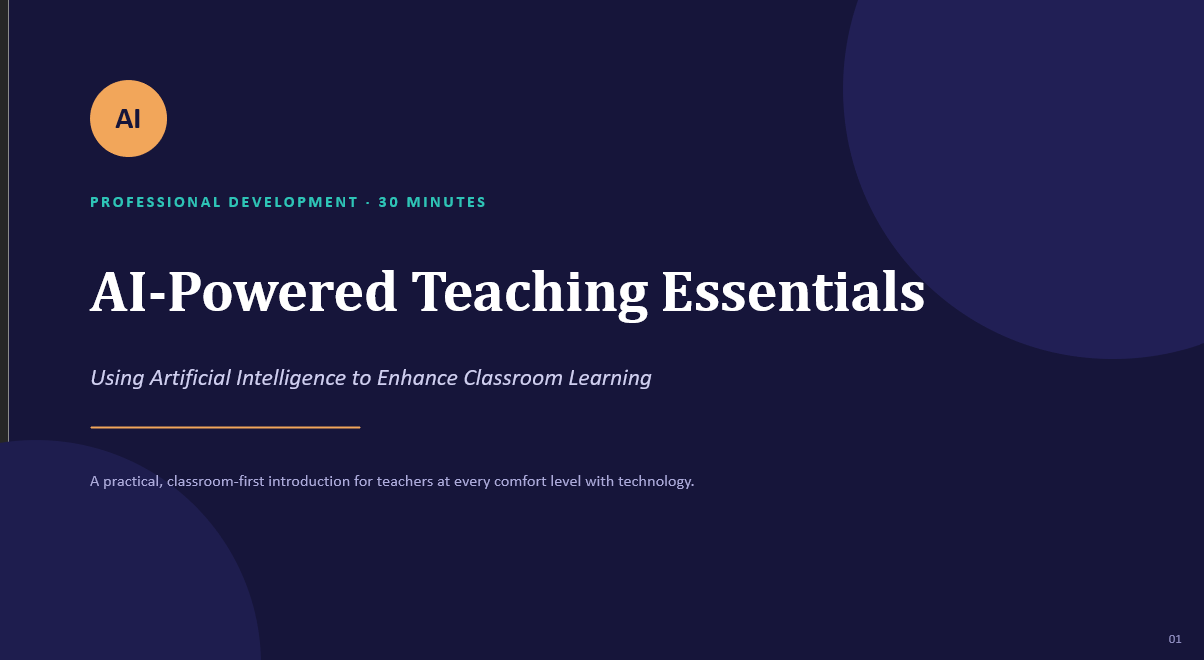
An AI literacy training deck helping teachers build practical, responsible AI skills for the classroom.
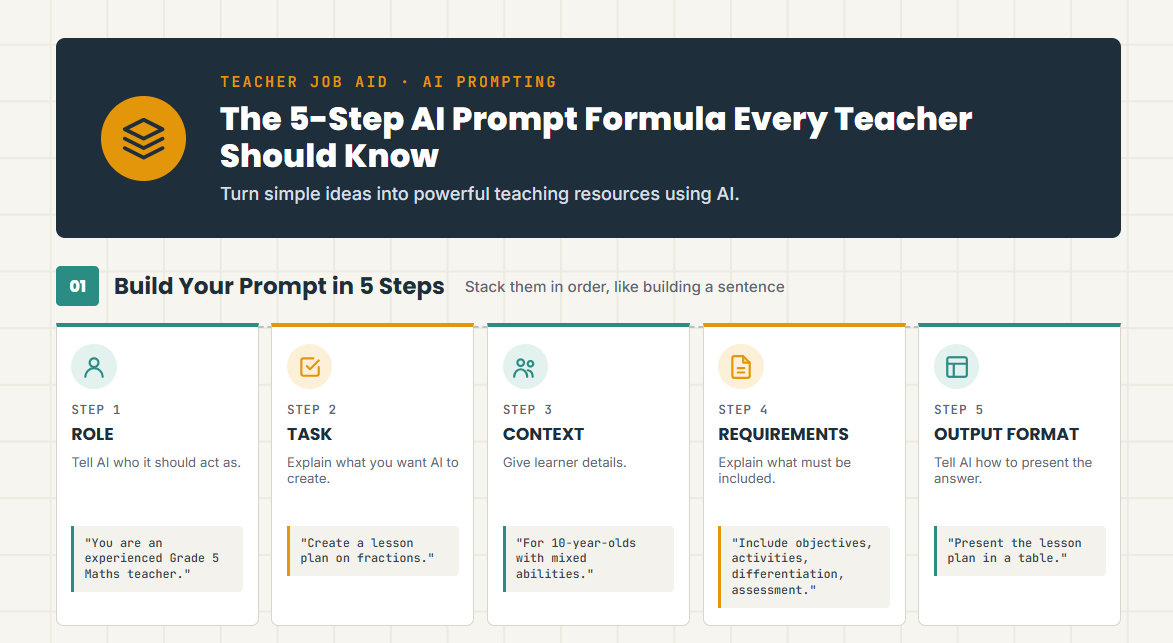
An interactive HTML job aid turning AI prompting into a simple, repeatable five-step framework.
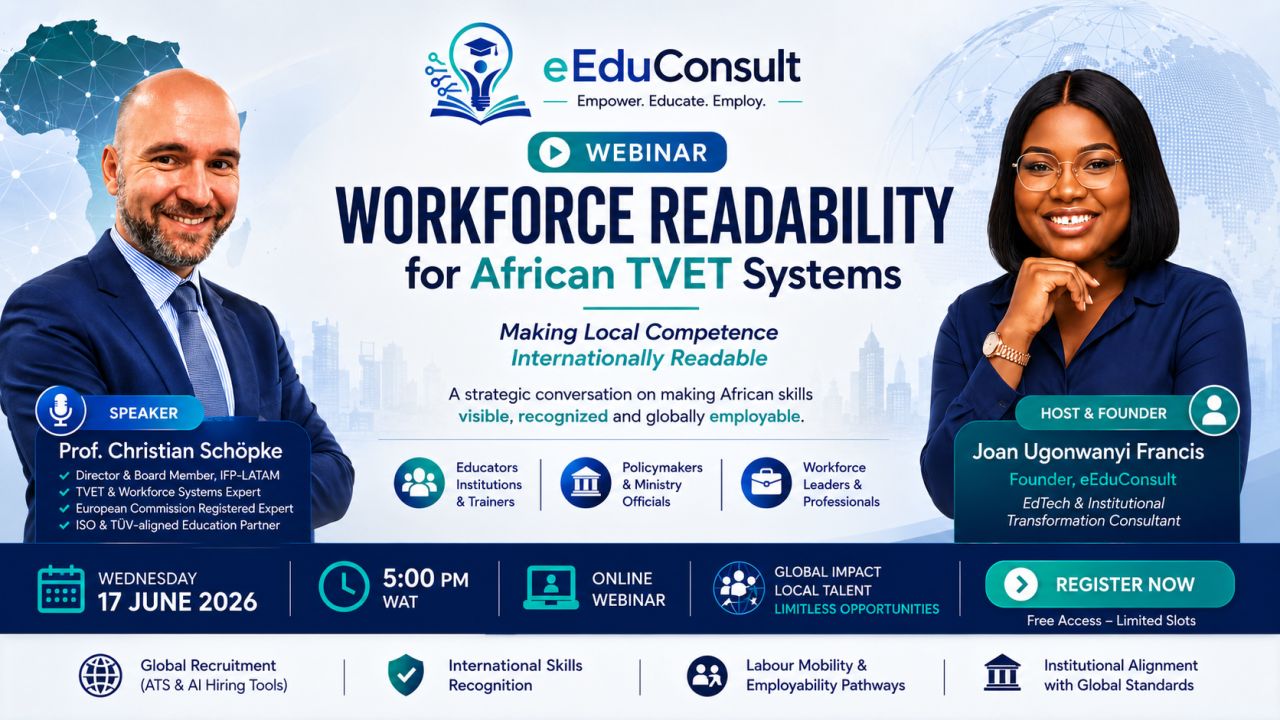
A virtual instructor-led session helping TVET professionals make local competence internationally readable.

An AI avatar-led course introduction produced with HeyGen, scripted around multimedia learning principles.
Every case study follows the same structure: learning problem, audience, objectives, instructional strategy, design process, development, assessment, technology, evidence, and reflection. Click a title to expand it.
Organizations regularly see conflict, miscommunication, and breakdowns in collaboration that have nothing to do with technical competence and everything to do with self-awareness, self-regulation, and relationship management. Most workplace training treats "soft skills" as a single afternoon workshop with no reinforcement — and it doesn't stick.
The brief was to build a self-paced course that gave learners a real framework for emotional intelligence, and enough practice through realistic scenarios that the framework would actually transfer back to their day-to-day interactions.
Working professionals across levels — individual contributors through to team leads — who interact with colleagues daily and want a practical, non-clinical way to understand their own emotional patterns and respond more effectively to others.
Rather than presenting EQ as a set of definitions to memorize, the course is structured around a single continuing workplace scenario: a project team under deadline pressure. Learners make decisions on behalf of a character at key friction points, see the consequence of each choice play out, and only then receive the underlying theory.
The course was structured in four modules, each mapped to one component of emotional intelligence: self-awareness, self-regulation, empathy, and relationship management. Each module storyboard specified the scenario beat, decision point, branching consequence, and knowledge check before any development began.
The course uses branching scenario slides, click-to-reveal reflection prompts, and drag-and-drop activities to keep learners actively deciding rather than passively clicking "Next." There is rarely a single "correct" branch, only more and less emotionally intelligent ones, with feedback that explains the trade-off.
Knowledge checks ask learners to identify the most emotionally intelligent response to a new scenario variant. A final assessment requires a short personal action plan naming one specific trigger and one specific regulation strategy, scored for completion and specificity.
The course was packaged to SCORM standard for LMS compatibility and deployed with full completion and score tracking.
Course landing screen — Articulate 360The branching structure works well for engagement, but tracking learner paths through xAPI rather than SCORM alone would let me analyze which decision points learners actually struggle with. I'd also add a manager-facing debrief guide, since EQ skills reinforced by a conversation with a manager transfer far better than a course completed in isolation.
New employees often struggle with unspoken workplace expectations, unfamiliar communication norms, and general uncertainty in a new culture — long before they've had a chance to demonstrate their actual skills. Traditional onboarding, delivered as a single orientation session or a PDF handbook, leaves most of this unaddressed.
The goal was a digital onboarding experience that supports new hires through that transition specifically — the practical, everyday moments that make someone feel confident or lost in their first five days.
The course follows the chronological arc of a first week: before day one, day one, the first few days, and settling in — surfacing the specific uncertainty a new hire is likely feeling at each stage.
Modules are scoped to 8–10 minutes each and designed to be revisited, rather than a single long sit-down session.
Interactive scenarios put the learner in common first-week situations — introducing themselves in a meeting, asking a question they're worried is "too basic" — and let them choose a response before revealing a model approach.
Reflective knowledge checks ask the learner to identify the most effective next step in a scenario, reinforcing judgment rather than rote recall. Completion is tracked as the primary onboarding milestone.
Warm illustrations, plain-language narration, and a conversational voice were chosen deliberately to counter the sterile feel of typical HR onboarding content.
The course was packaged as a SCORM module and deployed through SCORM Cloud for testing and delivery.
View the SCORM Cloud invitation →
Course landing screen — Articulate 360The course currently treats "first week" as universal, but the uncertainties of a remote hire and an in-office hire genuinely differ. A future version would branch the scenario content by work arrangement, and add a manager-facing companion piece.
Education professionals need safeguarding training that is accessible and engaging enough to actually change behavior, while staying rigorously aligned with current child protection expectations — in this case, the UK's Keeping Children Safe in Education (KCSIE) guidance. Much existing training is dense policy text with a quiz bolted on.
This course was developed for Sentinel Education Advisory Hub, an organization that equips schools and institutional leaders with safeguarding systems and professional development, and deployed through their Sentinel Online Academy.
The primary audience is teachers and education professionals who interact directly with children daily, and who need to recognize warning signs, understand reporting procedures, and know their own role boundaries.
Full instructional design documentation was completed before development: learning objectives mapped to each module, a scene-by-scene storyboard for every scenario, and a module sequence moving from recognition, to reporting procedure, to reflective practice.
Each module opens with a realistic classroom or staffroom scenario that stops short of clear resolution, asking the learner to decide what they would do and why, before the course reveals correct procedure.
Interactions were designed for H5P — branching scenarios, drag-and-drop sorting, reflective free-text prompts — with Canva used for supporting visual assets. The LMS structure in Tutor LMS was planned to house the course alongside a certificate of completion.
Knowledge checks assess whether learners can correctly identify the appropriate action in a new scenario variant, and a final assessment requires correctly sequencing a reporting procedure.
H5P was selected for its ability to embed scenario-based interactivity directly inside a WordPress-based Tutor LMS environment without a separate SCORM package, and the finished course was published live on Sentinel Education Advisory Hub's Sentinel Online Academy alongside a certificate of completion.
 Live course page — Sentinel Online Academy (Tutor LMS)
 Client site — Sentinel Education Advisory Hub
With the course now live, the next step is closing the feedback loop — pulling completion and quiz data from Tutor LMS to see where teachers hesitate, and using that to refine the scenario branches that aren't landing as intended.
Many teachers understand that AI tools exist and are relevant to their work, but lack the confidence to use them effectively or responsibly. The brief was to design a practical AI literacy resource that gave teachers real skills, not just awareness.
The analysis phase identified recurring tasks in a teacher's week — lesson planning, differentiated resource creation, rubric writing, parent communication — and used those as the anchor for every example in the deck.
The deck moves in three stages: what AI actually is and isn't, how to prompt it effectively, and where it fits into existing teaching workflows.
Slides are built around short live-practice activities — teachers draft a real prompt for a lesson they're actually planning, compare outputs, and revise.
Given the shorter delivery window compared to a full course, Analysis and Design were compressed into a single planning pass focused on objectives and activity design.
A single-session deck can build confidence but not habit. I'd pair this resource with a short follow-up job aid so teachers have something to return to after the session.
Teachers generally understand that AI tools are available, but many struggle at the exact moment of use — staring at a blank prompt box. A training session can build awareness, but it rarely survives contact with a Tuesday afternoon planning period.
The job aid teaches a single repeatable formula for constructing a prompt — covering role, task, context, format, and constraints — applicable across worksheets, rubrics, or parent emails.
Accessibility: plain language, clear on both desktop and mobile. Usability: steps are visually distinct and scannable in seconds. Quick-reference learning: one concrete teaching example per step. Workplace application: examples drawn from real teaching tasks.
The five-step formula was drafted first as plain text, tested against real teaching prompts, then translated into an interactive HTML layout with clear visual hierarchy.
The current version is a static reference. A natural next iteration would make it interactive — a teacher fills in each of the five fields and the job aid assembles the finished prompt for them.
African TVET professionals frequently hold genuine, hard-won competence — but struggle to make that competence legible to international employers, platforms, and credentialing systems.
The facilitator guide sequenced the session from context-setting through to concrete action, with discussion prompts built in at each transition point.
Discussion prompts asked participants to describe their own competence in their own words first, before introducing frameworks for documenting it.
Post-session feedback focused on whether participants left with a specific next action for their own visibility, rather than only a general satisfaction rating.
A single session can open the conversation but can't fully close the visibility gap. I'd extend this into a short follow-up series with lightweight accountability check-ins.
Traditional educational video production, involving filming, editing, and re-shoots, can be prohibitively expensive and time-consuming for a single course introduction.
HeyGen's AI avatar technology was used to produce a polished course introduction directly from a written script, without a camera, studio, or on-camera talent.
The script was drafted specifically for spoken delivery — shorter sentences, natural pauses, and a direct address to the learner.
Even with an AI avatar, standard multimedia learning principles still apply: minimizing extraneous detail on screen, pairing narration with simple supporting text, and keeping segments short.
A clear, human-feeling introduction sets expectations for the rest of the course and signals that the learning experience has been designed with care.
AI avatar video suits course introductions, microlearning explainers, and rapid multi-language localization. It's a poor substitute for content that depends on genuine human demonstration or real footage.
The next iteration would A/B test the AI avatar introduction against a live-action version with a small learner group, since engagement data should ultimately decide the right production choice.
AI can draft a storyboard variant, generate a script, or produce an avatar-led video in minutes. It cannot decide what a learner actually needs to be able to do differently after the course, or whether an assessment genuinely measures the stated objective.
Once I've defined a scenario's core decision point, AI can quickly draft alternate branch wording for me to edit, while I control the underlying decision logic.
Tools like HeyGen let me produce course introduction and microlearning videos directly from a script — see Case Study 07.
Designing AI literacy training for teachers, including Case Study 04 and the 5-Step Prompt Formula job aid.
I use ChatGPT and Claude as thinking partners for organizing storyboards and documentation — always reviewed against instructional design principles before development.
Open to international roles and projects in instructional design, learning experience design, and learning technology.
Reach out directly and I'll respond within one to two business days.
Seven real projects. One consistent process. Ready for the next international role.